
Elfsight and GDPR
This guide will explain which cookies Elfsight widgets use, how to manage or disable them, and which social media widgets use their own cookies. We’ll also cover how the use of Google Fonts in Elfsight widgets relates to GDPR compliance.
In this article
Elfsight Cookies
Elfsight itself uses one visitor-facing cookie:
elfsight_viewed_recently
This cookie helps prevent multiple view counts from the same visitor within 15 seconds.
To ensure GDPR compliance, we recommend one of the following options:
- 1
-
Adding this cookie's tech description to your cookie bot or content manager:
elfsight_viewed_recently
domain: core.service.elfsight.com, path: /, maxAge: 15000 (15 seconds), sameSite: none, httpOnly, secure
description: Used for implementing social platforms on the website. - 2
-
Disabling the cookie completely.
The cookie can be turned off only at the request of the account owner. For that, reach out to our Support Team.
Once disabled, the cookie will be turned off for all widgets created under the specified account.
Other Elfsight cookies interact only with account owners to ensure proper widget functionality.
Social Platform Cookies
Most Elfsight social media widgets do not use cookies from the corresponding social platforms. The exceptions are Facebook, YouTube, and Tumblr, which may use cookies provided by those platforms.
We cannot disable these cookies on our side. However, if you have any concerns regarding this matter, feel free to contact us. Our developers will consider your case individually. 👐
Google Fonts in Elfsight Widgets
Under GDPR, loading Google Fonts on your website requires user consent. If you'd prefer not to load Google Fonts through the Elfsight widget, follow these steps:
- 1
-
Identify the type of app you're using
We offer two types of apps: those with a font selection feature (e.g., Reviews) and those without a font selection (for example, FAQ app).
You can check whether this feature is available on the Style or Appearance tab in the widget editor.
- 2
-
For apps supporting font selection
Ensure that the Font setting is set to Default (Apply from Website):
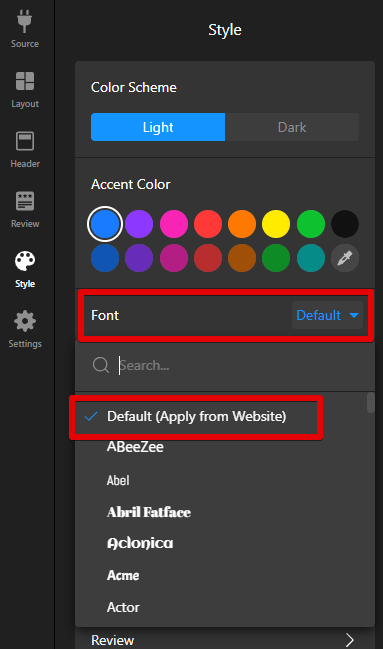
This way, the widget will use fonts from your website styles rather than loading Google Fonts directly through the widget settings.
- 3
-
For apps without font selection
No further action is needed. Since these apps automatically use the fonts from your website, they don't contradict GDPR rules.
Note: Google Maps app is an exception to this rule.
Although this app doesn’t have font selection and should use your website’s fonts, Google Fonts are automatically loaded when fetching location data from Google. Unfortunately, we cannot disable this functionality.
As an alternative, you can check out our Store Locator app, which uses a different method to load the locations.
Now you're all set to manage Elfsight cookies while keeping GDPR in mind. 🙌
FAQ
How can I configure my Cookie Bot to detect Elfsight cookies?
To help your cookie management tool detect Elfsight cookies, add elfsight.com to the Script URL Pattern field.
Do you provide a DPA (Data Processing Agreement)?
We don’t currently offer a Data Processing Agreement (DPA). However, our commitment to protecting user data is reflected in our data processing practices. For more information, please see our Privacy Policy and Section 3.2 of our Terms of Service.
What should I mention in my Privacy Policy when using Elfsight widgets?
If you use Elfsight widgets on your website, you may include the following statement in your Privacy Policy: